12. 列表
12.1 目标
- 理解列表的概念
- 学习列表的基本操作
- 学习利用索引
列表是非常有用的数据结构,它可以用来 同时 存储多个整数值,GPS坐标,逻辑值,和字符串. 不同类型的值可以被组合在一起,列表甚至可以包含其他列表.例如,列表可以储存机器人的路径,迷宫中宝石的位置,障碍物的位置和形状等等.列表中的对象是有顺序的,它可以被添加到列表末尾,通过索引获取它,或者删除指定位置的元素.
12.2 与Python的兼容性
Karel的列表是 Python 编程语言中列表的一个子集.换言之,任何在此处学到的东西都适用于 Python ,但是 Python 还提供很多Karel没有提供的额外功能.
12.3 创建列表
我们使用方括号创建列表.空列表 U 创建如下:
U = []
也可以创建非空列表:
V = [1, 2, 3, 4, 5]
我们也可以使用变量创建列表:
c = 100
W = [0, 50, c]
print W
输出为:
[0, 50, 100]
整数可以与字符串混合:
X = [1,"Hello", 2]
列表还可以包含其他列表作为元素:
Y = [1,"Hello", 2, [1, 2, 3]]
可以按如下方式打印列表:
print"This is the list Y:", Y
上述代码输出为:
This is the list Y: [1,"Hello", 2, [1, 2, 3]]
12.4 通过索引获取列表元素
列表元素可以通过索引获取,以便打印,赋值给其他变量或用在他处.索引总是从0开始.换言之, L[0] 是列表 L 的第一个元素, L[1] 是第二个元素, 以此类推.请见下例:
L = [8, 12, 16, 20]
print "First item:", L[0]
print "Second item:", L[1]
print "Third item:", L[2]
print "Fourth item:", L[3]
输出为:
First item: 8
Second item: 12
Third item: 16
Fourth item: 20
12.5 向列表追加元素
任何对象 obj (整数,文本字符,逻辑值,其他列表等)都可以通过 append() 函数添加到当前列表的末尾. 对于列表 L 方法如下:
L.append(obj)
进一步说明:
K = [1, 11]
K.append(21)
print K
输出:
[1, 11, 21]
12.6 通过pop()函数移除列表元素
列表 L 的第 i 个元素可以通过以下方法删除并且赋给新的变量 x :
x = L.pop(i)
为了展示,创建一个包含3个文本字符串”Monday”,”Tuesday”,”Wdenesday”的列表,然后删除第二个元素:
X = ["Monday","Tuesday","Wednesday"]
day = X.pop(1)
print day
print X
输出:
Tuesday
[’Monday’,’Wednesday’]
如果 pop() 函数不指定下标,它将移除列表的最后一个元素并返回它:
day = X.pop()
print day
print X
输出:
Wednesday
[’Monday’]
12.7 通过del命令删除元素
del 命令的功能类似于 pop() 函数, 但它不会保存被删除元素. 列表 L 的第 i 个元素可以通过如下方法删除:
del L[i]
请见下例:
L = ["Monday","Tuesday","Wednesday"]
del L[0]
print L
del L[0]
print L
输出:
[’Tuesday’,’Wednesday’]
[’Wednesday’]
12.8 列表的长度
函数 len(X) 返回列表 X 的长度.例子如下:
M = ["John","Josh","Jim","Jane"]
n = len(M)
print "Length of the list is", n
输出:
Length of the list is 4
12.9 解析列表
在Karel中,列表可以用 for 命令解析,与 Python 的用法一样. 以下例子定义了由4个元素1,2,3,4组成的列表 M ,打印它们,并且使每个元素增加2:
M = [1, 3, 5, 7]
for n in M
  print inc(n, 2)
输出:
3
5
7
9
12.10 记录robot的游走路径
使用 第十一节 中的 measurewall 函数,修改它为记录机器人的行走路径并返回. 新的函数称为 recordpath :
# Function to record robot’s path:
def recordpath
  L=[[gpsx, gpsy]]
  while wall
    left
    if not wall
      go
      L.append([gpsx, gpsy])
      right
      if not wall
        go
        L.append([gpsx, gpsy])
        right
        if not wall
          return L

# Record the path and print it:
print recordpath
这次我们用短一点的墙,以便使结果列表不要太长:
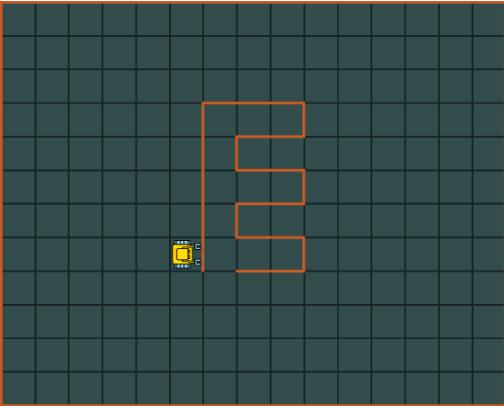
图1.记录机器人行走路径
运行程序输出为:
[[5, 4], [5, 5], [5, 6], [5, 7], [5, 8], [5, 9], [6, 9],
[7, 9], [8, 9], [9, 9], [9, 8], [9, 7], [8, 7], [7, 7],
[8, 7], [9, 7], [9, 6], [9, 5], [8, 5], [7, 5], [8, 5],
[9, 5], [9, 4], [9, 3], [8, 3], [7, 3], [6, 3], [6, 4]]
这便是正确的结果了,注意左下角的坐标是[0,0]
12.11 通过列表重放robot的行走轨迹
现在我们教Karel用储存的GPS坐标路径行走.确切地说,路径点将以[gpsx,gpsy]的形式储存在列表 L 中. 首先我们需要定义4个函数可以分别使机器人朝向东,南,西,北.还要实现一个程序 gotoposition ,将机器人从初始位置移动到另一个新位置NEWX, NEWY:
# Turn North:
def turnnorth
  while not north
    left

# Turn East:
def turneast
  turnnorth
  right

# Turn South:
def turnsouth
  turneast
  right

# Turn West:
def turnwest
  turnnorth
  left

# Move from the current position to
# a new position [NEWX, NEWY]:
def gotoposition
  # Horizontal direction first:
  posx = gpsx
  if posx < NEWX
    turneast
    repeat dec(NEWX, posx)
      go
  else
    turnwest
    repeat dec(posx, NEWX)
      go

  # Vertical direction:
  posy = gpsy
  if posy < NEWY
    turnnorth
    repeat dec(NEWY, posy)
      go
  else
    turnsouth
    repeat dec(posy, NEWY)
      go
正如你所见,上述程序并没有假设新的位置紧邻当前位置,这使得 gotoposition 具有更一般的应用. 最后一步很简单,只需解析列表 L ,将机器人引向新的位置:
# Parse list L, always go to the
# next position:
def playlist
  n = len(L)
  i = 0
  repeat n
    newpair = L[i]
    NEWX = newpair[0]
    NEWY = newpair[1]
    gotoposition
    inc(i)
之所以需要借助变量 newpair 是因为Karel不支持双下标索引. 接下来就可以用样例路径列表 L 来测试:
# Sample list L:
L = [[3, 10], [5, 5], [10, 10], [1, 1]]
# We need these two global variables:
NEWX = gpsx
NEWY = gpsy
# Go!
playlist
读者可以看到全局变量 NEWX , NEWY , L 的使用. 这虽不是最好的编程实践,但由于Karel语言的函数暂不接受参数,这是权宜之策. 未来将考虑实现传递函数参数功能.
12.12 记录宝石位置
宝石随机分散在迷宫周围.每个方块有可能包含多个宝石. 机器人需要沿着迷宫边走一圈,记录宝石的位置和数量,储存在一个列表中. 列表元素的形式为[gpsx,gpsy, number]. 最后打印出这个列表.
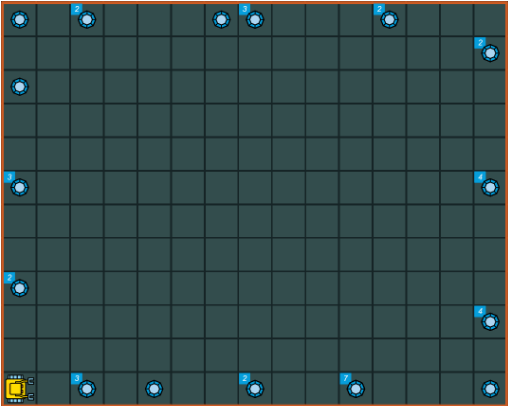
图2.宝石随机分散在迷宫周围
以下程序可以解决这个问题.首先写一个函数 countgems 数方块中的宝石并返回其数目:
def countgems
  num = 0
  # Collect all gems:
  while gem
    get
    inc(num)

  # Put the gems back:
  repeat num
    put

  return num
用以上函数就可以获得想要的列表了:
# Locate all gems:
def locategems
  repeat 4
    while not wall
      go
      if gem
        L.append([gpsx,gpsy, countgems])
    left

  return L

# Call the main function:
L = []
listofgems = locategems
print "Here is the report:"
print listofgems
输出为:
Here is the report:
[[2, 0, 3], [4, 0, 1], [7, 0, 2], [10, 0, 7], [14, 0, 1],
[14, 2, 4], [14, 6, 4], [14, 10, 2], [11, 11, 2], [7, 11, 3],
[6, 11, 1], [2, 11, 2], [0, 11, 1], [0, 9, 1], [0, 6, 3],
[0, 3, 2]]
12.12 列表中的列表
在一些程序中我们遇见列表包含其他列表.在其他编程语言中,嵌入列表的元素可以通过多重下标访问.在Karel中,暂不支持此功能,但这根本不是个事! 看下面的例子,使用上例的列表 L ,创建只包含宝石数目(不包含坐标)的列表 L2 :
L2 = []
for x in L
  L2.append(x[2])
print "Skipping the coordinates:"
print L2